How to Hide Prices on Shopify and Restrict Products on Your Shopify Store: 4 Steps for Retail & Wholesale Stores
Table of Contents
Introduction
If you want to hide prices on Shopify for wholesale buyers, you’re not alone — it’s one of the most common challenges for B2B merchants running a single store.
Regular customers see your B2B pricing. Competitors screenshot your rate cards. And your wholesale buyers don’t have a clean, private space to shop.
The typical solution? Build a second Shopify store just for wholesale. That means double the maintenance, double the inventory management, and double the headache.
There’s a better way. In this post, we’ll walk you through how to hide prices on shopify, restrict products, and create a proper B2B portal — all from your existing Shopify store.
Why Hiding Prices on Shopify Matters for B2B Sellers
If you sell both retail and wholesale, showing the same storefront to every visitor creates real problems:
- Retail customers see wholesale prices and expect the same discount.
- Competitors can easily compare your pricing structure.
- Unverified buyers can place wholesale orders without approval.
- Your brand feels less exclusive for serious B2B buyers.
Wholesale and B2B selling has its own set of rules. Your pricing, your minimum order quantities, even which products are available — these should only be visible to the right people.
The Old Solution: A Separate Shopify Store
Many merchants solve this by creating a second Shopify store exclusively for wholesale. It works, but it comes with real costs:
- Two sets of product listings to maintain
- Two sets of inventory to sync
- Two subscription fees
- Two themes to update
- No unified view of your total sales
For small and mid-sized businesses, this isn’t sustainable. It was the only option — until access control apps changed the game.
The Modern Solution: Access Control on Your Existing Store
With an access control app on Shopify, you can:
- Hide prices on shopify from visitors who aren’t logged in or approved
- Lock specific products or collections behind a password or customer tag
- Show “Login to view price” instead of actual pricing to retail visitors
- Use secret links to share access with specific customers privately
This means one store, two experiences — each perfectly tailored to the right audience.
How to Set This Up on Shopify: Step by Step
Here’s how a typical setup works using an access control app like LockPro:
Step 1: Install an Access Control App
Go to the Shopify App Store and install LockPro. It’s built specifically for B2B and wholesale merchants who need granular control over who sees what.
Step 2: Decide What to Lock
You have several options:
- Lock an entire collection (e.g., your wholesale catalogue)
- Lock individual products (e.g., trade-only items)
- Hide prices on shopify only while keeping products visible
- Lock pages (e.g., your wholesale terms or order forms)
Most wholesale merchants start by hiding prices on a specific collection and requiring buyers to log in to see them.
Step 3: Choose Your Access Method
LockPro gives you multiple ways to control access:
| Method | Best For |
|---|---|
| Customer Tags | Approved buyers you’ve already verified |
| Passcode | Quick access sharing without account creation |
| Secret Link | VIP customers or pre-launch access |
| Account-Based Rules | Full B2B portal with registration and approval |
For most B2B setups, customer tags work best. Once you approve a wholesale buyer, you assign them a tag (e.g., “wholesale”) and they automatically gain access every time they log in.
Step 4: Customise What Unverified Visitors See
Instead of showing your actual price, you can display a message like:
“Login to view wholesale pricing”
“Apply for a trade account to see prices”
“This product is available to approved buyers only”
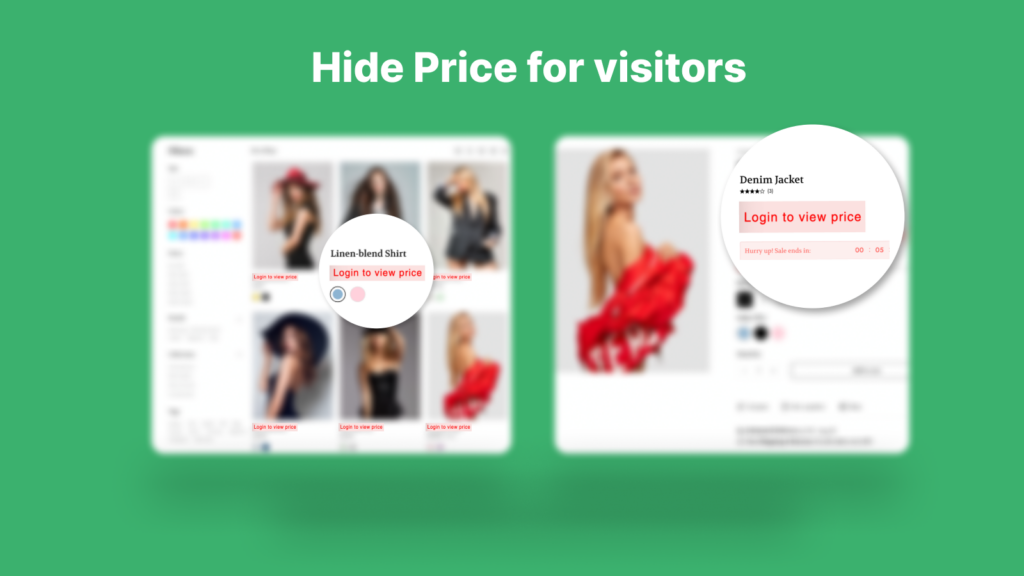
This keeps your store looking professional while nudging the right buyers toward registration.
LockPro also includes built-in analytics so you can see which locked pages get the most visits and who is accessing your restricted content.
Real Example: A Wholesale Apparel Brand
Imagine you run a clothing brand selling both direct-to-consumer and to boutique retailers.
Before access control:
- All prices visible to everyone
- Boutique buyers email you asking for a price list
- You manually send PDF catalogues back and forth
- Retail customers complain about price inconsistency
After setting up LockPro:
- Retail visitors see the product but not the price
- Boutique buyers log in and see wholesale pricing automatically
- New buyers fill out a simple application form
- You approve them once — they get access forever
- No more PDF price lists. No more manual emails.
Common Questions:
Q: Will hiding prices affect my SEO?
A: No. Search engines index your product names, descriptions, and page content — not the price itself. Hiding prices has no negative impact on your Shopify store’s search rankings.
Q: Can I hide prices on Shopify for some products but not others?
A: Yes. You can lock individual products, specific collections, or your entire store. The rules are fully customizable.
Q: What happens when an unverified visitor tries to access a locked page?
A: They see a message or login prompt. You control exactly what this looks like and what it says.
Q: Do customers need to create an account?
A: Not necessarily. If you use passcodes or secret links, customers can access locked content without creating an account.
Conclusion
Running a retail and wholesale business from one Shopify store is completely achievable — you just need the right access control setup.
By hiding prices on Shopify, locking collections, and creating a proper B2B login experience, you protect your pricing, streamline your wholesale process, and give serious buyers a professional space to shop.
No second store needed.
Ready to set it up? Try LockPro free on the Shopify App Store →